
Hi Experts,
Today i am sharing you Step by Step instructions for Implement caching in php website.
First of all we have to understand that what is cache exactly and how cache exactly works .
What is cache ?
Cache is a technique to optimize web page speed,load time and execution . it just reduces database calls and load by delivering contend by cached pages or objects which we saved in file-system or objects .We can Achieve cache with multiple logic like File Storage Cache(Most popular & this article is about itself),Object Stored cache( like Memcache),Application level cache (like Varnish Cache) ,SQL Query Cache.
Simply Cache is not a logic or program it is just a concept and that can be achieve with multiple logic or programs/techniques as above.
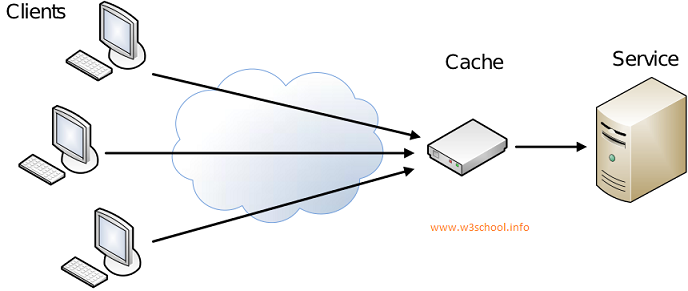
Now See that How Cache works with Server and Client See in Following Figure.
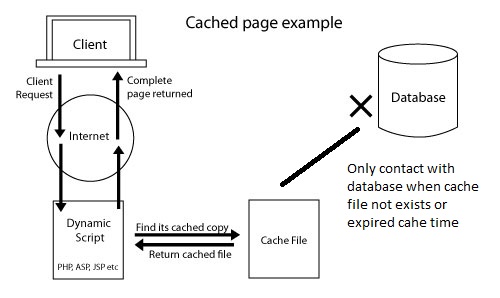
Now Step by Step Implement caching in php website
Step 1 : Create a Cache class with file name cache.class.php in your website root directory
<?php class cache{

public $cache_ext;
public $cache_time;
public $cache_folder;
public $ignore_pages;
public $dynamic_url;
public $_ignore_status;
public $_cache_file;


public function __construct($cache_ext  = '.html',$cache_time = 3600,$cache_folder   = 'cache_gen/',$ignore_pages   = array(),$cache_enable=1)
{

	$this->cache_ext=$cache_ext;
	$this->cache_time=$cache_time;
	$this->cache_folder=$cache_folder;
	$this->ignore_pages=$ignore_pages;
	$this->dynamic_url    = "http://".$_SERVER['HTTP_HOST']. $_SERVER['REQUEST_URI'] . $_SERVER['QUERY_STRING'];

      $this->_cache_file     = $this->cache_folder. md5($this->dynamic_url).$this->cache_ext;
      $this->_ignore_status = (in_array($this->dynamic_url,$this->ignore_pages))?true:false;
if($cache_enable==1)
{
	if (!$this->_ignore_status && file_exists($this->_cache_file) && time() - $this->cache_time < filemtime($this->_cache_file)) { //check Cache exist and it's not expired.
		ob_start('ob_gzhandler'); //Turn on output buffering, "ob_gzhandler" for the compressed page with gzip.
		readfile($this->_cache_file); //read Cache file
		echo '<!-- cached page by cache class by w3school - '.date('l jS \of F Y h:i:s A', filemtime($this->_cache_file)).', Page : '.$this->dynamic_url.' -->';
		ob_end_flush(); //Flush and turn off output buffering
		exit(); //no need to proceed further, exit the flow.
	}
}
	 //Turn on output buffering with gzip compression.
	ob_start('ob_gzhandler');
}


}

?>
Step 2 : Put Following code Before your website header file/template file or any file where you want to achieve cache.
Note : this code should be always upper from your <html> tag starts.
<?php
include 'cache.class.php';

//parameters list//
$cache_ext  = '.html';//cache file extension
$cache_time = 3600; //in seconds eg: 3600=60*60 means 1 hour cache time you can change it also
$cache_folder   = 'cache_gen/'; //folder in which you want to save cache
$ignore_urls   = array();//define a array with full url which you want to ignore for generating cache.
$cache_enable=1; //0 for disable caching and 1 for enable caching functionality.
//parameters list//
$cache_obj=new cache($cache_ext,$cache_time,$cache_folder,$ignore_urls,$cache_enable);

?>
Step 3 : In the Footer template or page just After the </html> close tag.
<?php

if (!is_dir($cache_obj->cache_folder)) { //create a new folder if we need to
    mkdir($cache_obj->cache_folder);
}
if(!$cache_obj->_ignore_status){
    $fp = fopen($cache_obj->_cache_file, 'w');  //open file for writing
    fwrite($fp, ob_get_contents()); //write contents of the output buffer in Cache file
    fclose($fp); //Close file pointer
}
ob_end_flush(); //Flush and turn off output buffering

?>
Step 4 : Check you page and see that for the time you set in code or by default 1 hour you webpage will give same output for all users very quickly.
Question : how to verify that cache is implemented or not
Answer : load your webpage where you implement this cache system after it CTRL+U or see page source. in that in last of your code there will be a html comment having following text
” cached page by cache class by w3school ”
Now Enjoy the Script by https://www.w3school.info/